
After a campaign is registered (and supporting files added), CSPs then share the campaign with an upstream Connectivity Partner (CNP) who works with them to provision the campaign for Mobile Network Operators (MNOs).
A CNP may be another CSP registered with TCR or a Direct Connect Aggregator (DCA). The upstream CNPs in the connectivity chain will either accept or decline campaigns that are shared with them. If a campaign is declined, a reason will be provided through TCR’s feedback mechanism. Once a DCA accepts a campaign, the campaign is then clear to run on MNO networks.
Sharing Principles
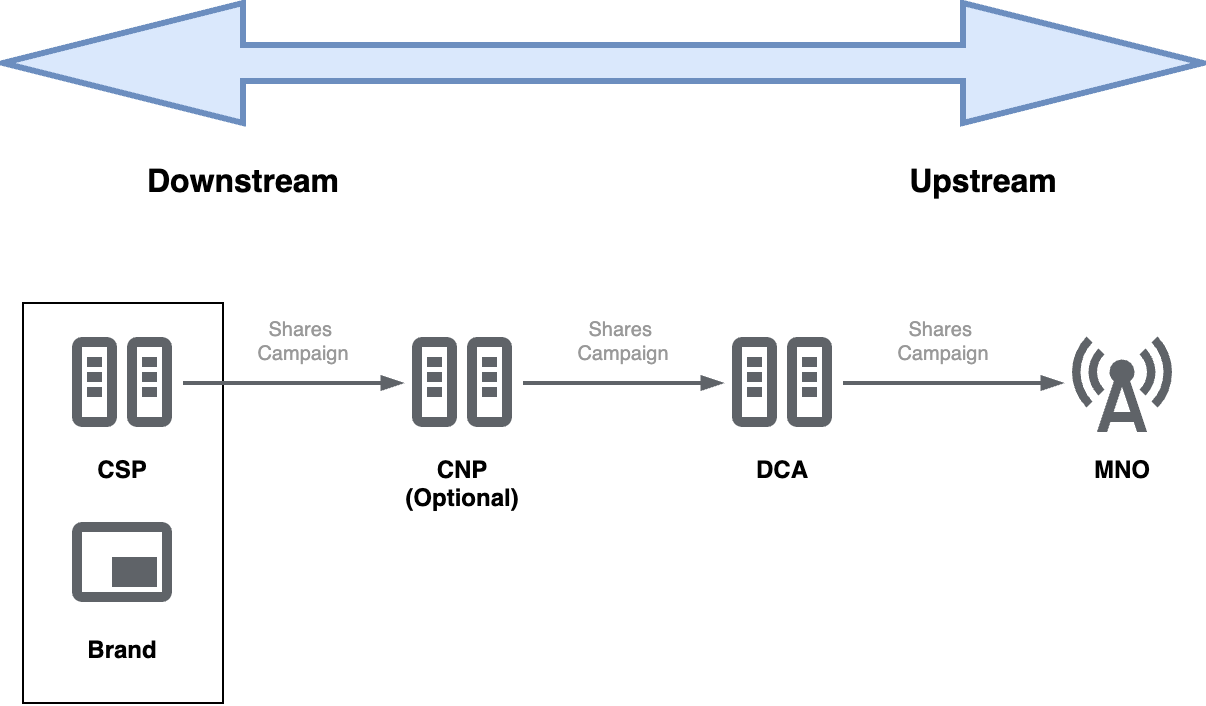
The following diagram and bullet points illustrate how campaigns are shared in TCR.
-
The term Upstream CNP describes a partner you have shared a campaign with. Conversely, the term Downstream CNP describes a partner who has shared a campaign with you.
-
If a CSP has a relationship with a DCA, they can share their campaigns directly to the DCA without an intermediate CNP.
-
Once a campaign is shared, its
sharingStatuschanges to PENDING. While a campaign’s sharing status is PENDING, the Downstream CNP can’t rescind the sharing request or change the Upstream CNP. -
All CNPs and DCAs have a responsibility to review every campaign submission for compliance. An Upstream CNP can accept or decline a sharing request from a downstream partner, and all downstream partners are notified of any changes to a campaign’s sharing status via a webhook event.
-
Declined campaigns will be marked with a DECLINED
sharingStatus. When this happens, the Downstream CNP can share the campaign with a different Upstream CNP or make changes to the campaign and try to resubmit it to the same Upstream CNP. -
Accepted campaigns will have an ACCEPTED
sharingStatus. A campaign is considered accepted when an Upstream CNP either shares the campaign to another CNP, or if the Upstream CNP is a DCA who accepts the campaign.
-
-
When a campaign is shared with an Upstream CNP, certain campaign details are shared based on the role of the CNP.
When shared with another CSP, the majority of the campaign’s details are obfuscated or hidden. However, when a campaign is shared with a DCA, all the campaign details, including the connectivity chain, are shown to the DCA.
Share a Campaign
Sharing a campaign with a connectivity partner will make it available to them with a PENDING sharingStatus. They can then choose to accept or decline the campaign. If they decline it, they'll have to provide an explanation as to why they chose that action.
Before You Begin
-
Make sure you have the
campaignIdof the campaign you want to share. -
Have ready the
upstreamCnpIdof your Upstream CNP or DCA. You can use the endpointGET /enum/cnpto return a full list of available partners.
Request
PUT /campaign/{campaignId}/sharing/{upstreamCnpId}
curl -X 'PUT' \
  'https://csp-api-staging.campaignregistry.com/v2/campaign/C123ABC/sharing/DCA123' \
  -H 'accept: application/json'
Response
{
  "downstreamCnpId": "S123ABC",
  "upstreamCnpId": "DCA123",
  "sharingStatus": "PENDING",
  "explanation": null,
  "sharedDate": "2025-06-11T01:07:39.000Z",
  "statusDate": "2025-06-11T19:14:59.000Z",
  "cnpMigration": false
}
Declined Campaigns
Whenever a campaign is declined, the Upstream CNP who rejected it must provide an explanation (e.g., they could require additional sample messages). In order to see that explanation, submit a request using the endpoint below.
This endpoint is generally useful in showing whether your shared campaigns have been accepted or declined by upstream partners, although a webhook event also exists than can notify you.
Request
GET /campaign/{campaignId}/sharing
curl -X 'GET' \
  'https://csp-api-staging.campaignregistry.com/v2/campaign/C123ABC/sharing' \
  -H 'accept: application/json'
Response
{
  "sharedByMe": {
    "downstreamCnpId": "S123ABC",
    "upstreamCnpId": "DCA123",
    "sharingStatus": "DECLINED",
    "explanation": "Please provide an additional sample message.",
    "sharedDate": "2025-06-11T01:07:39.000Z",
    "statusDate": "2025-06-11T19:31:35.000Z",
    "cnpMigration": false
  }
}